Find-A-File — Track and Locate RFID-Tagged Physical Files & Documents with a Mobile App
Find A File is a powerful standalone mobile app paired with RFID handheld scanner designed to help organizations quickly locate, track, audit, and manage physical files and documents tagged with RFID tags/labels. Built for speed and accuracy, the app enables users to identify the exact location and status of files, documents, and assets in real time, significantly reducing search time and manual effort. It is one of the most cost-effective solutions for file tracking, inventory management, and audit readiness without requiring any server or IT infrastructure, making it ideal for small to medium-sized businesses and departments.
The application supports RFID tag encoding using standard RFID printers as well as direct tag encoding through the mobile app, providing flexibility in tag creation and deployment. Key features include file and object search, single and bulk item location, audit and inventory management, and RFID-based verification, making it ideal for file/object tracking and inventory control/audit.
To support enterprise workflows, Find A File / Find An Object offers seamless integration with laptops and desktops using CSV files. Users can populate a predefined CSV template on their computer and import it into the mobile application after transferring it to the designated mobile folder. This enables bulk data uploads, faster onboarding of records, and easy synchronization between desktop systems and mobile operations.
Widely used across government departments, legal offices, warehouses, libraries, healthcare facilities, and enterprises, the solution improves operational efficiency, accuracy, and accountability while ensuring reliable RFID-based tracking, audit readiness, and secure file and object management from a single mobile platform.
Find-A-File (Find-An-Object) — At a Glance
- Also Known As: Find-An-Object, RFID File Locator App, Mobile File Tracking App, Android RFID File Finder, Physical File Finder App
- Platform: Standalone Android mobile app paired with a Bluetooth RFID handheld sled — no server or IT infrastructure required
- Key Capabilities: Real-time file location, quick inventory & audit, search by list, multi-location support, RFID tag encoding, CSV import/export
- Works Offline: Fully offline operation with local data storage — no internet connection required
- Served Sectors: Government departments, legal firms, healthcare, banking & financial services, enterprises, libraries, warehouses, and small-to-medium businesses
- Data Integration: CSV import/export for desktop-to-mobile data sync; compatible with RFID printers for tag encoding
Key Features of Find-A-File Application
Find Missing Files Quickly with RFID Handheld Scanner
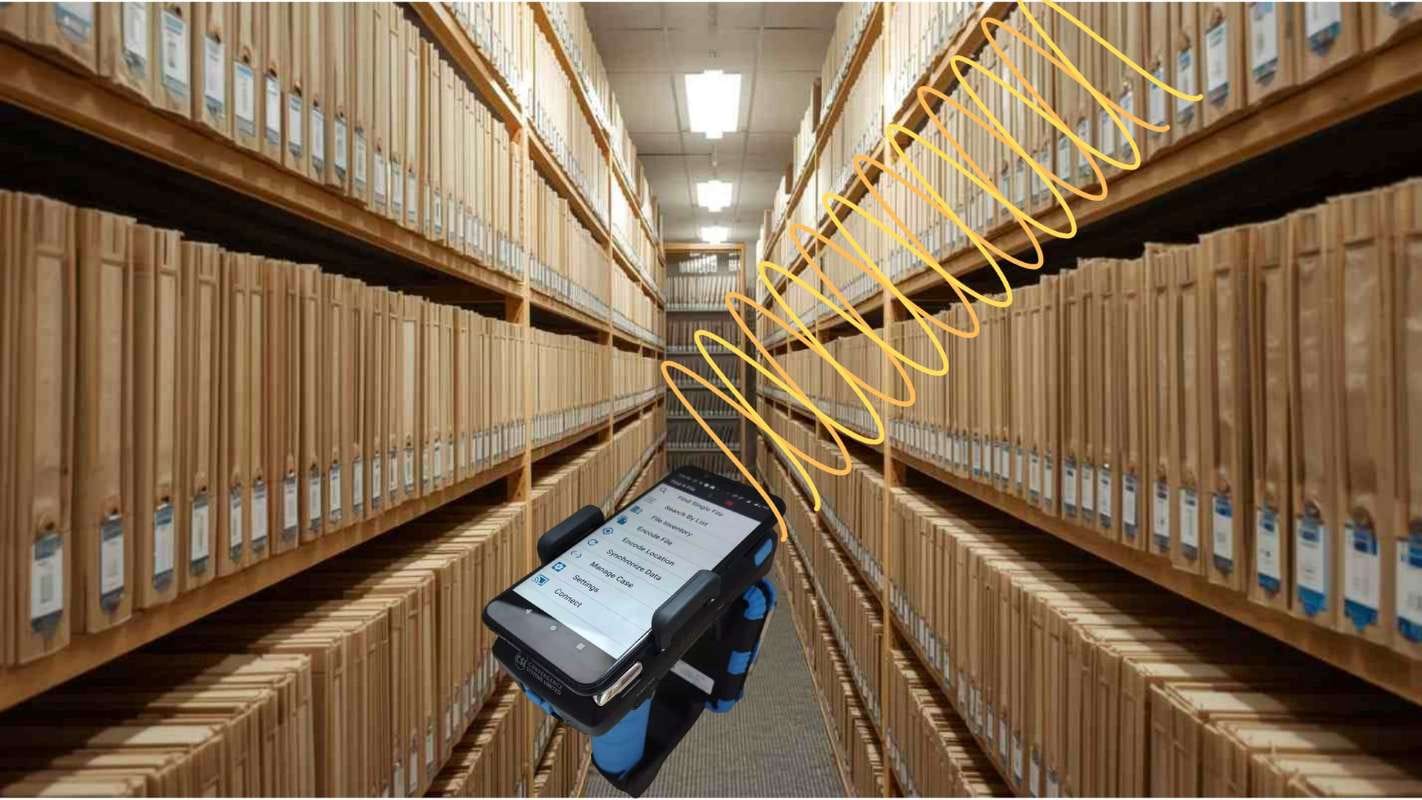
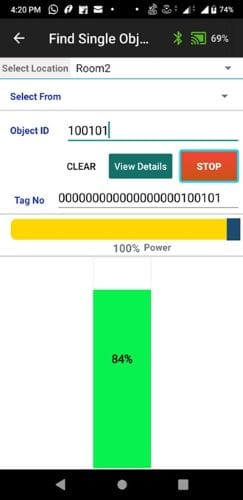
Files and documents tagged with RFID labels can be quickly located/tracked inside file cabinets, storage boxes, or other physical locations using Find-A-File application (mobile devices paired with RFID handheld scanners). The system provides real-time proximity feedback, allowing users to pinpoint the exact location of a required file without opening folders or manually checking labels. This significantly reduces search time, minimizes operational disruption, and eliminates labor-intensive manual searches—helping organizations save valuable time, reduce costs, and improve overall efficiency while ensuring better control over critical records.
Multi-Location Support
The Find-A-File mobile application supports multi-location operations, allowing organizations to manage and track files across multiple offices, departments, or storage sites from a single mobile platform. Users can scan a location barcode within the app and associate RFID-tagged files with that specific location, ensuring accurate placement and real-time location mapping. This enables seamless storage, search, and retrieval of files across multiple locations using the same standalone mobile application. By supporting location-based scanning and RFID tracking, the app simplifies file organization, improves accuracy, and provides instant visibility into where files are stored—making multi-site file management faster, more efficient, and highly reliable.
Quick Inventory & Audit
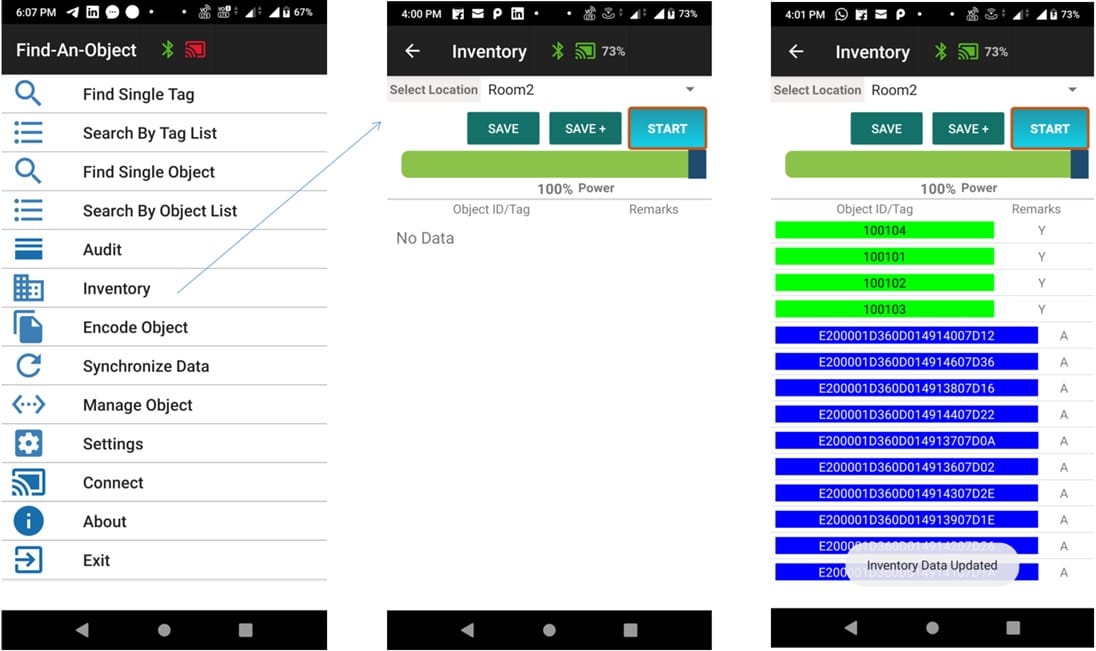
With the Find-A-File mobile app and RFID handheld scanners, organizations can perform fast and accurate inventory and audits of files, documents, and archive boxes. Bulk scanning of RFID-tagged items instantly captures file presence and location without opening folders or checking labels, automatically updating file status in real time.
The app also simplifies audits by quickly identifying missing, misplaced, or unauthorized files, reducing audit time while improving accuracy and compliance. Using real-time proximity feedback, users can rapidly locate misplaced files within cabinets or storage rooms, eliminating manual searches and minimizing disruption. Overall, RFID-enabled scanning makes file tracking faster, more efficient, and more reliable.
Cost Effectiveness
The Find-A-File mobile application delivers significant cost savings by reducing manual effort, minimizing errors, and streamlining file tracking processes. The app does not need any additional IT hardware, hence saving on hardware costs. Automated RFID scanning eliminates time-consuming manual searches, audits, and reconciliations, allowing staff to locate and verify files within minutes rather than hours. Additionally, by minimizing misplaced, lost, or duplicated files, the system helps reduce costs associated with file recovery and rework. Real-time visibility into file location and status improves overall operational efficiency. This leads to better resource utilization, reducing the need for excess storage and additional administrative staff. Overall, the app provides a strong return on investment by lowering operational costs while enhancing accuracy and productivity in file management.
Additional Features:
Associate File/Object with Location
Associate RFID tagged files with Locations. Locations are tagged with Barcodes.
Encode File/Object ID into RFID EPC
Encode File or Object ID directly into RFID EPC for seamless identification.
Find Files Quickly with Handheld Scanner
Quickly locate files or objects by scanning RFID tags using your mobile device.
CSV Integration
Import data from CSV files created on laptops or desktops for easy data entry and management.
Find Single Tag/Object
Locate a single object using the Find Single Tag/Object function for quick retrieval.
Search by List
Locate multiple objects simultaneously using Search by List functionality.
Configurable File ID Length
Configurable File ID length support to match your organizational standards.
Left & Right Zero Padding
Left and Right Zero padding for File ID to maintain consistent formatting.
No Server Required
No Server, No IT Infrastructure required - works independently on your mobile device.
Perfect for Small/Medium Businesses
Very useful for small and medium sized businesses seeking cost-effective tracking solutions.
Data Export/Import
Data Export and Import using CSV files for seamless data portability.
Industries & Use Cases
Find-A-File (Find-An-Object) is a versatile standalone RFID mobile app that can be deployed rapidly in any environment where RFID-tagged physical files, documents, or objects need to be located, inventoried, or audited — with no server or IT infrastructure required.
Government Departments
Government offices managing large volumes of case files, permits, application folders, and correspondence use Find-A-File to instantly locate RFID-tagged files across record rooms and storage areas, conduct rapid inventory audits, and identify missing or misplaced files — without needing any server infrastructure or dedicated IT resources.
Legal Firms
Law firms and courts managing case files, evidence folders, and legal documents use Find-A-File to quickly locate specific files using the Find Single Tag function, audit all files in circulation using a handheld scanner, and search for multiple files simultaneously with the Search by List feature — saving hours of manual searching across filing cabinets and shelves.
Banking & Financial Services
Banks and financial institutions handling loan files, mortgage documents, and title records use Find-A-File to enroll records with dual RFID and barcode labels, perform fast inventory checks across vaults and archive rooms, and locate individual documents on demand — supporting compliance requirements with minimal operational overhead.
Healthcare
Hospitals and clinics tracking physical patient records, lab folders, and medical files use Find-A-File to quickly audit files stored across multiple departments, locate specific patient records using RFID proximity scanning, and manage files across multi-location storage environments — all from a single mobile device without any server dependency.
Enterprises
Enterprises managing HR files, contracts, vendor folders, and compliance documents across multiple offices use Find-A-File's multi-location support to associate files with specific storage locations, bulk-import existing records via CSV, and conduct rapid department-level inventory audits — making it an ideal low-cost entry point for RFID-based file tracking at scale.
Case Studies
Find-A-File has been deployed across government agencies, legal institutions, and enterprises looking for a cost-effective, standalone RFID solution for physical file tracking, inventory, and audit — with no server infrastructure required.
NTC (Nationwide Title Clearing)
Nationwide Title Clearing is a leading provider of document processing services for the mortgage and financial services industry. GOBO Find-A-File Tracking Application was deployed to manage their physical title and document files from enrollment through audit. Each new record is enrolled in the system and mapped to both an RFID label and a barcode label, creating a dual-identification record from day one. A mobile scanner is used by staff to rapidly inventory files in circulation, conduct full file audits, and locate missing files — significantly reducing the time and effort required compared to manual paper-based tracking.
Railsa Associates
Used Find-A-File to track and locate RFID-tagged physical files using a mobile device paired with an RFID handheld scanner. The app's multi-location support and Search by List functionality allowed staff to efficiently manage files across multiple storage areas and quickly retrieve specific items on demand — significantly reducing the time spent on manual searches and audits.
Frequently Asked Questions
The GOBO File & Document Tracking System is a full enterprise solution with a centralized server, web-based interface, biometric check-in/out, chain-of-custody management, file circulation workflows, retention and destruction policies, RFID portal-based movement detection, SSO integration, and multi-user access control. Find-A-File can also complement the full system as a mobile tool for field-based inventory and file location tasks.