Quick Answer
Banks can tell you the exact time, amount, and location of every transaction you ever made - because they built systems to record it all automatically. Physical files in most organizations work the opposite way: they move from desk to desk with no system tracking them. Physical file tracking closes this gap. The GOBO File and Document Tracking System brings bank-grade traceability to physical files - every movement logged, every custodian accountable, every file locatable in seconds.
What This Article Covers
- How banks set the standard for digital traceability - and what we can learn from it.
- Why physical files are still central to daily operations in many organizations.
- Who handles physical files and why they cannot simply "go digital" overnight.
- What goes wrong when physical files are not tracked properly.
- How RFID-based physical file tracking works in plain language.
- How the GOBO File and Document Tracking System brings the bank model to physical files.
Table of Contents
- What Banks Got Right: Full Traceability by Default
- Physical Files Are Still Running Your Organization
- Who Still Works With Physical Files Every Day
- The Gap: Digital Money, Untraceable Files
- What Happens When Files Are Not Tracked
- How RFID File Tracking Works (Simply Explained)
- How GOBO Brings Bank-Grade Tracking to Physical Files
- Conclusion
- Frequently Asked Questions
What Banks Got Right: Full Traceability by Default
Think about how your bank account works. You send money to someone using UPI. Within seconds, you receive a message: the amount, the recipient's name, the time, the transaction reference number. If you check your statement a year later, that same transaction is still there - complete, accurate, unchangeable.
Your bank does not rely on anyone remembering to write it down. It does not depend on a person manually updating a register. The system records it automatically the moment it happens. Every transaction. Every time.
This is not magic. It is just good system design. Banks understood early on that financial accountability requires automatic, real-time recording of every movement of value. They built their systems around this principle. Today, you can check the full history of every rupee in your account - when it came in, when it went out, who sent it, who received it - at any time, instantly, from your phone.
Now ask yourself: can your organization do the same for its physical files?
Physical Files Are Still Running Your Organization
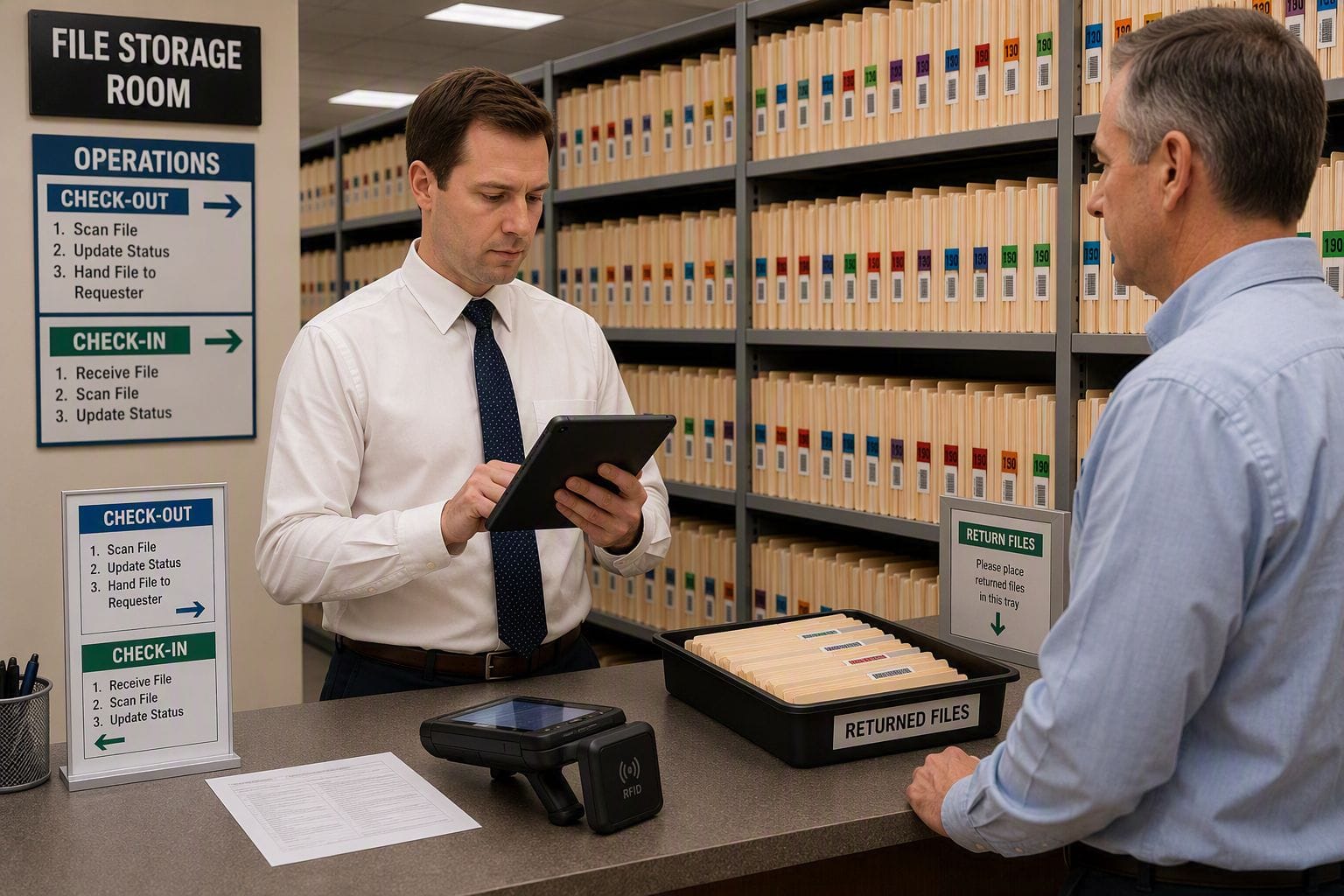
There is a common assumption that "everything is digital now." For many things, this is true. Bank accounts, tax returns, train tickets - these live entirely in digital systems. But walk into any government office, district court, public hospital, police station, or even a large private bank's loan department, and you will find something else entirely: shelves and shelves of physical files.
These are not old archives gathering dust. These are active, working files that move from desk to desk every single day. A land acquisition file sitting with the revenue officer today may be on the collector's desk tomorrow. A patient's medical record may travel from the ward to the lab to the doctor's cabin and back. A loan application file may pass through four departments before a decision is made.
Physical files exist because many things still require original documents, original signatures, and physical custody records. Until all of that changes - and it will take years, if not decades - physical files are not going away. The question is only whether your organization knows where they are.
Who Still Works With Physical Files Every Day
The answer is: far more organizations than people realize.
| Organization Type | Examples of Physical Files They Handle |
|---|---|
| Government departments | Land records, revenue files, pension files, RTI files, project approval files |
| Courts and tribunals | Case files, evidence records, judgment copies, summons files |
| Hospitals and clinics | Patient medical records, lab reports, treatment history, insurance claim files |
| Banks and NBFCs | Loan files, KYC documents, mortgage deeds, property papers |
| Law firms | Client case files, court briefs, contract originals, deposition records |
| Police stations | Case files, FIR records, evidence custody logs, warrant files |
| Schools and universities | Student admission files, mark sheets, certificate originals, fee records |
| Enterprises and corporates | HR files, vendor contracts, compliance records, board meeting documents |
In every one of these organizations, critical decisions depend on those files being in the right place at the right time. A doctor cannot start a procedure without the patient's previous records. A judge cannot proceed without the case file. A bank cannot disburse a loan without the signed originals. A government officer cannot process an RTI request without the relevant file.
The Gap: Digital Money, Untraceable Files
Here is the uncomfortable truth. The same officer who can check their savings account balance to the exact paisa on their smartphone cannot tell you - without physically searching - where an important case file is right now.
Banks made sure money is traceable. But nobody made physical files traceable in the same way. And so the same organizations that process payroll digitally, file income tax digitally, and even conduct video conferences digitally - are still tracking their physical files the old-fashioned way: manual registers, dak books, and asking colleagues.
How Banks Track Money
- Every transaction recorded automatically
- Timestamp, amount, sender, receiver - always captured
- Full history accessible instantly from anywhere
- Alerts for unusual activity sent in real time
- No manual register. No "ask a colleague."
How Most Offices Track Files
- Entries written manually in a movement register
- Verbal handovers with no written record
- History scattered across multiple section registers
- No alerts when a file is overdue
- Locate a file by asking around the office
The contrast is stark. And the consequences of this gap are real.
What Happens When Files Are Not Tracked
When physical files have no tracking system behind them, the problems are predictable - and they happen over and over again.
Files go missing at the worst possible moment
A file is needed urgently - for a court hearing, an RTI deadline, a patient in the emergency ward, a board meeting. Nobody can find it. Staff spend hours searching desks, cabinets, and adjoining rooms. Sometimes it is found. Sometimes it is not.
Nobody knows who had it last
When a file cannot be located, the first question is always "who had it last?" Without a tracking system, nobody can answer this reliably. The register may show an entry from three weeks ago. After that, nothing. The file moved - but the movement was never written down.
Accountability disappears during staff transitions
An officer goes on transfer or extended leave. The files at their desk go with nobody knowing what was there. The incoming person inherits a pile of papers with no record of what is outstanding, what has been returned, or what was never supposed to be at that desk at all. Files effectively vanish from the system at this point.
Audits become a stressful scramble
When an internal audit, CAG inspection, or court inquiry asks for a file's movement history, the answer should be immediate. Without a tracking system, staff must compile entries from multiple registers, fill in the gaps from memory, and hope the record is consistent enough to be credible. Often it is not.
Compliance deadlines are missed
RTI responses, court summons compliance, insurance claim processing, loan disbursement - all have legal deadlines. When the required file cannot be located in time, those deadlines are missed. The consequences range from financial penalties to contempt of court proceedings to regulatory action.
Sensitive files are accessed without authorization
Without a system recording who accessed which file, confidential documents can be reviewed, copied, or removed without any trace. In a manual environment, this may never be detected. In a tracked environment, every access is recorded.
How RFID File Tracking Works (Simply Explained)
Think of RFID file tracking as applying the same logic banks use for transactions - to physical files.
A small RFID tag is attached to each file folder. Think of it as a digital ID card for that file. When the file moves past an RFID reader - installed at key points like file room exits, section entry gates, or issue counters - the system automatically records it. No one has to write anything down. The system captures it the moment it happens.
The result: every file has a complete, automatic, tamper-proof movement record. Who had it. When. For how long. Where it went next.
| Bank Transaction Tracking | RFID Physical File Tracking |
|---|---|
| Each transaction has a unique ID | Each file has a unique RFID tag ID |
| System records amount, sender, receiver, time | System records file number, person, location, time |
| No manual entry needed - system does it automatically | No manual register needed - RFID reader does it automatically |
| Full transaction history always available | Full file movement history always available |
| Alerts for unusual or overdue activity | Alerts when a file is overdue or accessed outside permissions |
| Any branch, any device - same account view | Any section, any terminal - same file location view |
For areas where fixed readers have not yet been installed, staff use a handheld RFID scanner - about the size of a TV remote - to walk through a storage room and instantly identify every file present. What would take a day of manual counting takes thirty minutes with a handheld scanner.
How GOBO Brings Bank-Grade Tracking to Physical Files
The GOBO File and Document Tracking System is built specifically for physical file and document circulation. It does for physical files exactly what core banking software does for financial transactions: captures every movement automatically and makes the complete history always available.
Real-time file location - like checking your balance
Any authorized staff member can open the GOBO dashboard and search for any file by number, name, or subject. The system shows the current location: which section, which officer, since when. No phone calls. No register checks. No searching. The same instant answer you get when you check your bank balance.
Digital custody records - like your transaction history
Every issue, transfer, and return is recorded with the user's identity and a timestamp. This creates a continuous chain of custody for every file - who had it, when they received it, when they passed it on. Just as your bank statement is a permanent record of every transaction, the GOBO system is a permanent record of every file movement.
SLA-based overdue alerts - like a credit card payment reminder
Each file type can be assigned a maximum hold period. If a file has not been returned within the allowed time, the GOBO system automatically sends an alert to the concerned section officer - and if there is still no action after a further period, escalates to their supervisor. The file does not quietly sit on a desk for weeks without anyone knowing.
Tamper-proof audit trail - like a bank's reconciliation record
Movement records in the GOBO system cannot be edited or deleted after the fact. This is the same principle banks use for their transaction logs. In a CAG audit, court matter, or vigilance inquiry, the department can produce a complete, credible custody history for any file - no manual compilation, no gaps, no contradictions.
Role-based access - like a bank's maker-checker system
Banks do not let every employee access every account. GOBO applies the same principle to files. A clerk can view files in their section. A section officer can see all files in their section and raise alerts. A superintendent or administrator has a broader view. Sensitive files are visible only to those with the appropriate permission level.
Works for both RFID and barcode - one system, flexible deployment
Not every office can immediately install RFID reader infrastructure everywhere. GOBO allows you to start with barcode scanning and upgrade to RFID readers at key points as you expand. The database, the reports, and the dashboard stay the same. You do not have to change systems as you scale.
Ready to Give Your Files the Traceability Your Bank Account Already Has?
The GOBO File and Document Tracking System is ready for deployment in government departments, hospitals, courts, banks, and enterprises. For a walkthrough or pilot discussion, contact the GOBO team.
Conclusion
We live in a time when you can transfer ten thousand rupees across the country in three seconds and have proof of it forever. That same level of traceability - automatic, accurate, always available - is entirely achievable for physical files. The technology exists. The systems exist. The only thing missing is the decision to implement them.
Physical files are not going away in the near future. They carry legal weight, original signatures, and evidentiary value that digital copies often cannot replace. For the organizations that depend on them - government departments, courts, hospitals, banks, law firms - the inability to locate a file quickly is not a minor inconvenience. It has real legal, financial, and human consequences.
Banks showed us what is possible when you build systems that record everything automatically. Physical file tracking applies exactly that thinking to the folders, dockets, and case files that are still running so many critical operations.
If your organization is ready to stop wondering "where is that file?" and start knowing - the GOBO File and Document Tracking System is the place to start. Reach out to the GOBO team to discuss what a deployment would look like for your specific environment.